---
title: "23 Game-Changing Python Packages You Are Missing Out On"
source: "https://medium.com/pythoneers/23-underrated-python-packages-you-didnt-knew-existed-36dbb0a417c0"
author:
- "[[Abhay Parashar]]"
published: 2024-10-20
created: 2024-10-29
description: "Python’s popularity as a programming language is undeniable, largely thanks to its expansive ecosystem of external packages crafted by a vibrant community of developers. While many of us are…"
tags:
- "clippings"
---
## Python Hidden Gems!! (A Handpicked Collection)
## Make Your Life Easy By Exploring These Hidden Gems
[

](https://medium.com/@abhayparashar31?source=post_page---byline--36dbb0a417c0--------------------------------)
[

](https://medium.com/pythoneers?source=post_page---byline--36dbb0a417c0--------------------------------)

Image From FreePik, Edited Using Canva.com
Python’s popularity as a programming language is undeniable, largely thanks to its expansive ecosystem of external packages crafted by a vibrant community of developers. While many of us are well-versed in the usual suspects — like NumPy, Pandas, and Flask — there’s a treasure trove of lesser-known libraries out there, just waiting to enhance your coding journey. In this article, we’re diving deep into some underrated Python packages that you *must* try. Whether you’re looking to streamline your workflow or discover new tools to tackle everyday challenges, these hidden gems will surely enhance your Python experience.
> “Python packages: tiny tools, massive impact, endless possibilities.”
## 1\. ==Ruff==
***“The fastest linter has arrived in the town!!”***
Ruff is a modern Python liner and code formatter library, written in Rust providing an efficient way to catch and fix common issues with your Python code.
**Key features-**
- 10–100x faster than existing linters (like flake8) and formatters (like Black).
- Built-in caching to avoid re-analyzing unchanged files.
- Provide support for automatic error correction.
- Over 800+ built-in rules, with native re-implementation of popular fixes Flage8 plugins. Like flake8-bugbear.
- Easy integrations for VS Code and more.
==Ruff can be used to replace== ==[Flake8](https://pypi.org/project/flake8/)== ==(plus dozens of plugins),== ==[**Black**](https://github.com/psf/black)====**,**== ==[**isort**](https://pypi.org/project/isort/)====**,**== ==[**pydocstyle**](https://pypi.org/project/pydocstyle/)====**,**== ==[**pyupgrade**](https://pypi.org/project/pyupgrade/)====**,**== ==[**autoflake**](https://pypi.org/project/autoflake/)====**, and more**====, all while executing tens or hundreds of times faster than any individual tool.==
```
pip install ruffruff path/to/your/project
```
Let’s review one of my test directories with a bunch of badly written code and see how it performs.
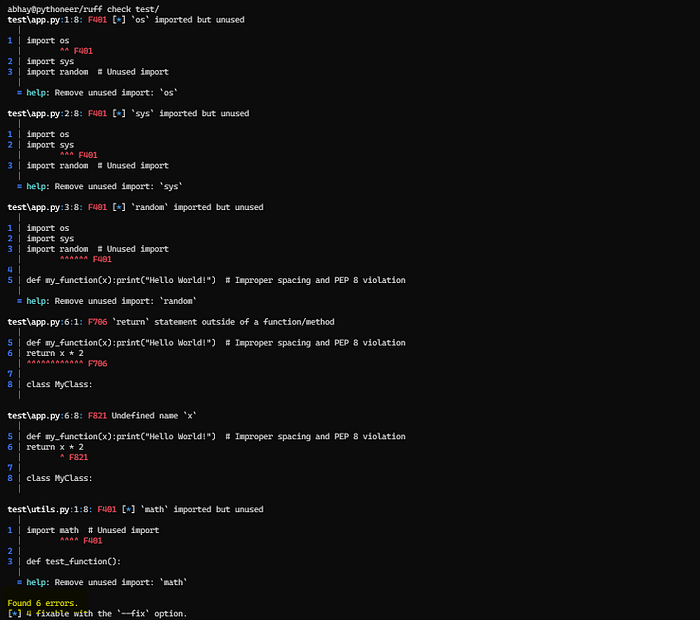
ruff output — Screenshot by Author
You know ??
You can even ask **Ruff** to fix issues with your project.
Sounds fascinating right ??
Let’s try that too…
> “Speed is irrelevant if you are going in the wrong direction.” — M. Gandhi
>
> The next package will ensure you’re both fast and headed in the right direction.
## 2\. ==HTTPX==
***“Supercharge your HTTP requests with httpx — async-ready and user-friendly!”***
**httpx** is a fully featured, user-friendly HTTP client for Python, providing synchronous and asynchronous support. It’s designed as a next-gen alternative to `requests`, allowing you to take advantage of modern async features without sacrificing simplicity. Whether you're dealing with REST APIs, web scraping, or external HTTP services, httpx offers a clean and efficient API to get the job done.
**Some key features of HTTPX:**
- Best Replacement for Requests
- Built-in support for asynchronous requests.
- Custom timeouts, retries, and more.
Let’s utilize the **HTTPX Python** library and scrape all the amazing quotes from the open-source [QuotestoScrape](https://quotes.toscrape.com/) site.
```
import httpxfrom bs4 import BeautifulSoupimport asynciourl = 'https://quotes.toscrape.com/'async def scrape_quotes(): async with httpx.AsyncClient() as client: response = await client.get(url) soup = BeautifulSoup(response.text, 'html.parser') quotes = soup.find_all('div', class_='quote') for quote in quotes: text = quote.find('span', class_='text').get_text() author = quote.find('small', class_='author').get_text() print(f'"{text}" - {author}')async def main(): await scrape_quotes()if __name__ == "__main__": asyncio.run(main())
```
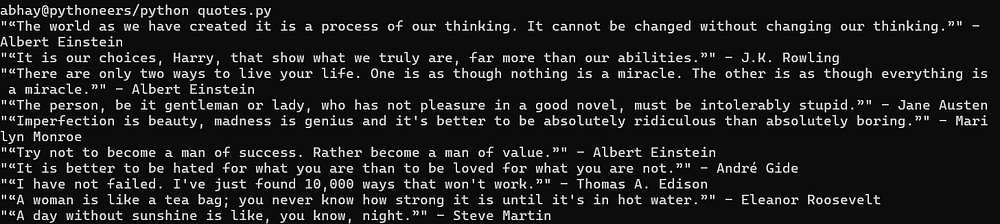
Script Output — Scraped Quotes — Screenshot By Author
> You can learn more about this library by reading this [**article**](https://scrapfly.io/blog/web-scraping-with-python-httpx/).
## 3\. ==Precommit==
***“Automate your code quality with pre-commit hooks!!”***
Pre-commit is a framework that allows you to define and enforce code quality checks before every commit. It integrates seamlessly with Git and runs checks like linters, formatting, and security tools to ensure your code meets specific quality standards before it’s pushed into the repository.
## Key Features —
- Automated checks.
- MultiLanguage support.
- Easy Configuration.
## **How To ??**
1. Create a `.pre-commit-config.yaml` file in your project root directory.
```
repos: - repo: https://github.com/abhayparashar31/webscraping rev: v0.0.285 hooks: - id: ruff args: ["--fix"] - repo: https://github.com/pre-commit/mirrors-black rev: stable hooks: - id: black - repo: https://github.com/asottile/blacken-docs rev: v1.12.0 hooks: - id: blacken-docs
```
2\. Install the git hook scripts
```
pre-commit install
```
3\. Commit it !!!
```
git commit -m "You commit comment!!"
```
Pre-commit will review your code for errors and automatically fix them!!
## 4\. webview
***“Quite simple yet very effective”***
Webview is a Python package that allows you to create lightweight, native-looking desktop applications using web technologies like HTML, CSS, and Javascript.

My honest reaction when i first discovered this package…Just Amazing
It proves a simple way to display web content in a GUI, making it easy for developers to build and run web-based applications locally without complex frameworks.
Some key features of webview Python package include —
- Cross-Platform.
- Lightweight.
- Easy integration with API.
- Javascript support.
- Fully customizable.
```
pip install pywebview
```
Let’s build a simple ToDo List GUI using the Webview library —
```
import webviewtasks = [] html_content = """ To-Do List
To-Do List
"""class Api: def get_tasks(self): return tasks def add_task(self, task): tasks.append(task); return tasks def remove_task(self, index): tasks.pop(index); return tasksif __name__ == '__main__': webview.create_window('To-Do List App', html=html_content, js_api=Api()) webview.start()
```
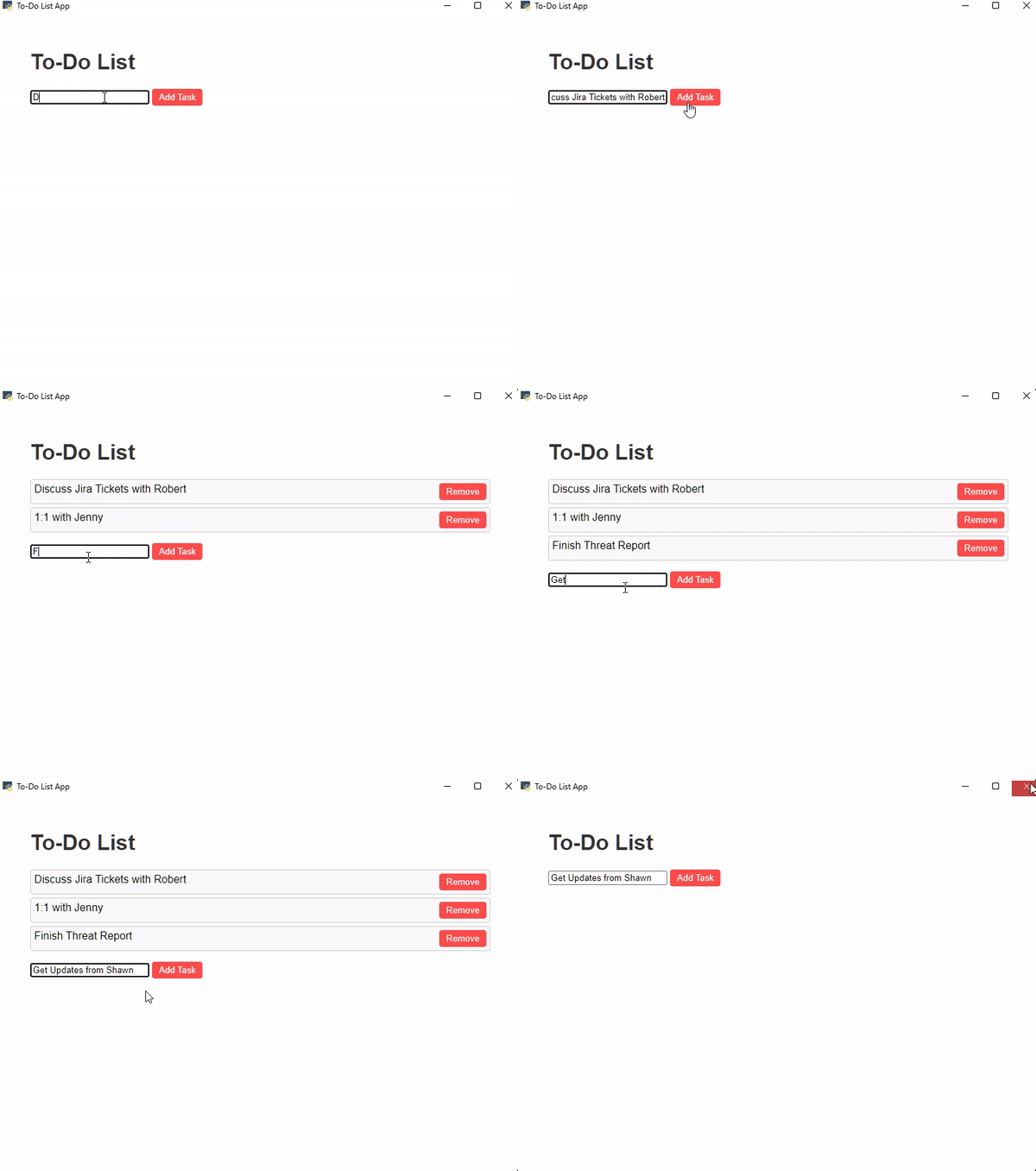
**Todo List GUI** — **Created Using webview library** — Script Output GIF crated using ezgif.
Want to learn more about this library ?? Check out their [***official repo***](https://github.com/r0x0r/pywebview) containing lots of useful stuff.
## 5\. ==FTFY==
***“Turning Garbled Text into Clean Magic!”***
FTFY (Fixes Text For You) is an amazing Python library that helps clean up messy text caused by encoding errors, especially when characters get scrambled due to misinterpreted encodings (also known as *mojibake*). It automatically detects and fixes these issues, turning unreadable text back into a clear, readable format with little effort.
It supports —
- Automatic detection and correction of encodings
- Wide range of encodings.
```
import ftfycorrupted_text = 'ThÃs Ãs an ëxample of mójibake.'fixed_text = ftfy.fix_text(corrupted_text)print("Original corrupted text:", corrupted_text)print("Fixed text:", fixed_text)
```

**FTFY** Script Output — Screenshot By Author
Learn more about this library [***here***](https://ftfy.readthedocs.io/en/latest/)***.***

Let’s do some reconstruction on your python program output
## 6==. Rich==
***“Make Your Terminal Shine with Stunning”***
Rich is a powerful Python library that helps you reconstruct your console with color and style and display advanced content such as tables, markdown, syntax-highlighted code, etc.
You can make Rich yours by using the below command.
```
pip install rich
```
Here’s some sample code you might wanna give a try…
```
from rich.console import Consolefrom rich.table import Tableconsole = Console()# Create a table to display some datatable = Table(title="Daily Updates!!!")table.add_column("Task", justify="left", style="cyan")table.add_column("Status", justify="right", style="green")table.add_column("Comments", justify="right", style="magenta")table.add_row("Patch 2.3.2", "[bold green]Completed[/]", "Patched Sucesssfully!")table.add_row("Vendor Callout", "[bold yellow]In Progress[/]", "Connected, Waiting for Response!!")table.add_row("Meeting with Client", "[bold red]Failed[/]", "Client Rescheduled Meeting!!")# Print the tableconsole.print(table)
```
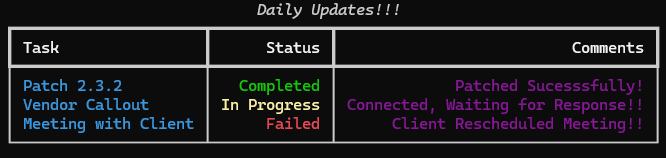
Script Outpit — Rich Python library — Screenshot By Author
Check out their [**official docs**](https://rich.readthedocs.io/en/stable/introduction.html) for more detailed information about this package.
## 7\. ==WeasyPrint==
***“Convert your web pages into polished PDFs effortlessly.”***
WeaspyPrint allows you to generate PDF files directly from your HTML and CSS code files. It is especially useful for web developers who need to create print-ready documents from their web pages without relying on Javascript engines or heavy browser dependency.
Some key features of this **weasyprint** library include —
- Converts HTML/CSS into high-quality PDFs. in a blink.
- Provides support for SVG images and embedded fonts.
- Capable of handling multiple pages, headers, and footers automatically.
- Lightweight and fast.
You can review and try some examples from their [**official website**](https://weasyprint.org/).
## 8\. ==MyPy==
***“Catch errors before they break your code!”***
MyPy is a handy tool that serves as a static type checker for Python. Think of it as your coding buddy that helps you add type annotations to your code. Doing this allows you to catch potential type-related mistakes before they become real headaches.

that’s how we gonna catch errors with this package..picture perfect!!
Let’s see how this library improves your coding lifestyle by identifying type-checking errors —
```
import gensimfrom gensim.summarization.summarizer import summarizefrom gensim.summarization import keywordsimport wikipediawikisearch = wikipedia.page("Machine Learning")wikicontent = wikisearch.contentprint(wikicontent)summary_ratio = summarize(wikicontent, ratio = 0.01)print("summary by ratio")print(summary_ratio)summary_wordcount = summarize(wikicontent, word_count = 200)print("summary by word count")print(summary_wordcount)
```

Script Output — **MyPy** — Screenshot By Author
Get a sneak peek of how this can be useful by reading this [***article from RealPython***](https://realpython.com/lessons/type-checking-mypy/)***.***
## 9\. Bandit
***“Catch the culprits of your code, your very own Python security sentinel!!”***
Bandit is a security-focused static analysis tool designed to find common security issues in Python code. It scans your codebase, looking for potential vulnerabilities like SQL injection, hard-coded credentials, and weak cryptography usage. This tool helps ensure that your Python applications stay secure, even as they grow in complexity.
**Some key features of this library include —**
- Security Vulnerability Detector.
- Customizable scans.
- Simple CI/CD Integration.
- Detailed report generation, with links to additional context regarding flagged issues.
Let’s try this package on a highly insecure code example —
```
import requestsimport osAPI_KEY = "sk_test_4eC39HqLyjWDarjtT1zdp7dc" AWS_SECRET_ACCESS_KEY = "wJalrXUtnFEMI/K7MDENG/bPxRfiCYEXAMPLEKEY"DB_PASSWORD = "mypassword123"URL = "http://example.com/api/v1/resource"response = requests.post(URL, data={"api_key": API_KEY, "password": DB_PASSWORD})
```
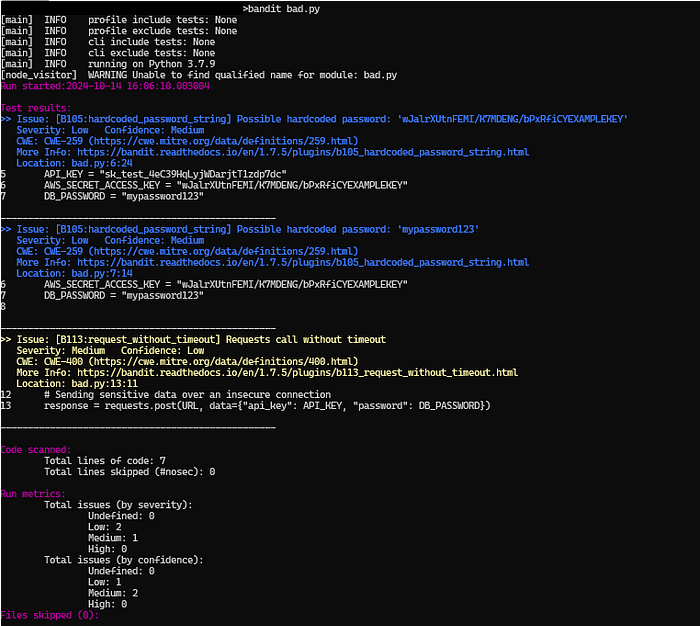
Bandit Scan Result — **Bandit** — Screenshot By Author
Here’s **the** [**official documentation**](https://bandit.readthedocs.io/en/latest/) of Bandit if you wanna dig more around this library.
## 10\. FlashText
***“Search faster, not harder, lightning-quick keyword extraction!”***
FlashText is an efficient Python package for keyword extraction and text replacement. Unlike traditional regular expressions, FlashText uses a Trie data structure to store keywords, enabling it to search for whole words without scanning text character by character like regular expressions.
It quickly traverses the Trie when it encounters matching characters, avoiding redundant backtracking and skipping irrelevant text. This makes it much faster for keyword search and replacement, especially when dealing with large keyword lists, as it processes all keywords in a single pass.
**Some key features of FlashText includes —**
☑️ Super fast keyword research and extraction.
☑️ Allows case-sensitive searches.
☑ Produce fewer false positives.
Let’s utilize Flashtext to replace certain keywords inside a TXT file with over 1000+ rows, and compare its performance with regex.
```
import timeimport refrom flashtext import KeywordProcessorwith open("sample.txt", "r") as file: text = file.read()keywords = { "Python": "PYTHON", "Java": "JAVA_REPLACED", "JavaScript": "JS_REPLACED"}def regex_example(text): for key, value in keywords.items(): text = re.sub(r'\b' + re.escape(key) + r'\b', value, text) return textstart_time = time.time()regex_replaced = regex_example(text)regex_time = time.time() - start_timedef flashtext_example(text): keyword_processor = KeywordProcessor() for key, value in keywords.items(): keyword_processor.add_keyword(key, value) return keyword_processor.replace_keywords(text)start_time = time.time()flashtext_replaced = flashtext_example(text)flashtext_time = time.time() - start_timeprint("\nTime Taken by Regex: {:.6f} seconds".format(regex_time))print("\nTime Taken by FlashText: {:.6f} seconds".format(flashtext_time))
```
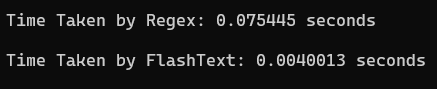
Script Output — FlashText — Screenshot By Author
## 11\. ==Pydantic==
***“Type your data into shape”***
Pydantic is a fast and flexible Python library designed for data validation and settings management. It provides intuitive tools for parsing and validating data, ensuring that everything meets to the specified types and constraints. Pydantic, ensures your data is accurate and well-structured, making your development process smoother and more efficient.
## **Why Pydantic ??**
- Enhances code clarity and control through type hints.
- Offers rapid processing, leveraging core validation written in Rust.
- Automatically generates JSON Schema for seamless tool integration.
- Supports validation of built-in types like data classes and TypedDicts.
- Provides options for custom validators and serializers.
- Integrated into over 8,000 packages, including FastAPI.
Below is a simple Python example using pedantic —
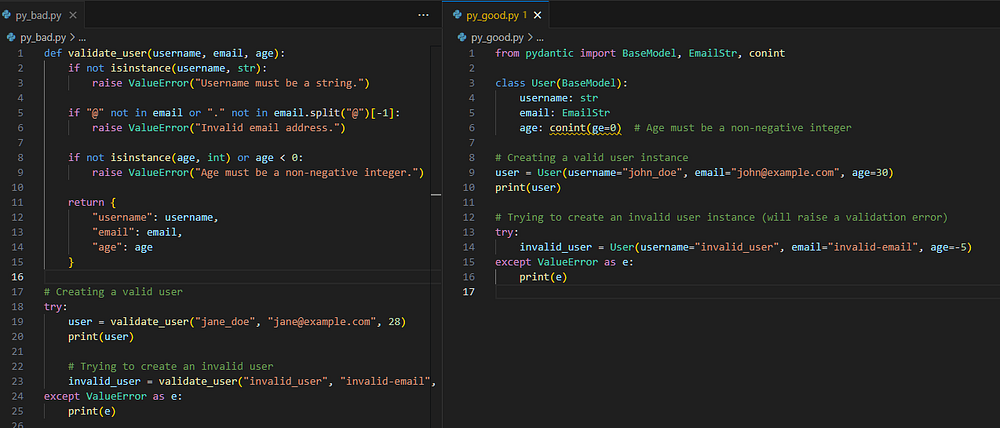
Without vs With Pydantic — Screenshot By Author
You can see how using the Pydantic library has streamlined the code, making it shorter and clearer by eliminating the need for custom `validate_user()` methods.
## 12\. ==Unimport==
***“A single line to simplify your imports across environments”***
These powerful tool servers as both a linter and formatter, making it easy to detect and remove any unused import from your codebase, leading to a more efficient and less cluttered code.
```
pip install unimport
```
Let’s use this package and run it against one of my most recent small data science projects to see how it performs…
## 13\. ==WTForms==
***“Your go-to tool for handling web forms with ease”***
WTForms is a powerful and flexible form-handling and validation library, that simplifies the process of handling user input by automating common tasks such as validation, error handling, and rendering HTML forms.
WTForms supports data validation, CSRF protection, internationalization (I18N), and more.
- Easy integration with Flask.
- Functionality to create custom form fields or extend existing ones to match your web app’s needs.
- Automatically generates user-friendly error messages.
```
from wtforms import Form, BooleanField, StringField, validatorsclass RegistrationForm(Form): username = StringField('Username', [validators.Length(min=4, max=25)]) email = StringField('Email Address', [validators.Length(min=6, max=35)]) accept_rules = BooleanField('I accept the site rules', [validators.InputRequired()])
```
You can take this crash course from WTForms to get a good understanding of the library [**here**](https://wtforms.readthedocs.io/en/3.0.x/crash_course/).

Deadman ❌ Deadcode ✅
## 14\. ==Vulture==
***“Dead code detector”***
Vulture is just another Python package, which is why I love Python. It is designed to find unused code in your projects. It scans through your codebase, identifying functions, classes, and variables that are defined but never used. By removing this dead code, Vulture helps you streamline your project, reduce technical debt, and improve maintainability.
Here’s some sample code to test the capabilities of this package —
```
def used_function(): print("This function is used")def unused_function(): print("This function is not used")class UnusedClass: def method(self): return "Unused method"used_function()
```
Let’s run Vulture on this snippet using `vulture sample.py`

Script Output — **Vulture** — Screenshot by Author
## 15\. Pydeps
***“Visualize your Project’s dependencies with ease!!”***
Pydeps is a Python tool that generates dependency graphs for your project. It helps visualize the relationships between the modules in your code, giving you a clearer picture of how everything is interconnected.
Some key features of *Pydeps* package include —
- Easy to use.
- Highly customizable.
- Supports large codebases.
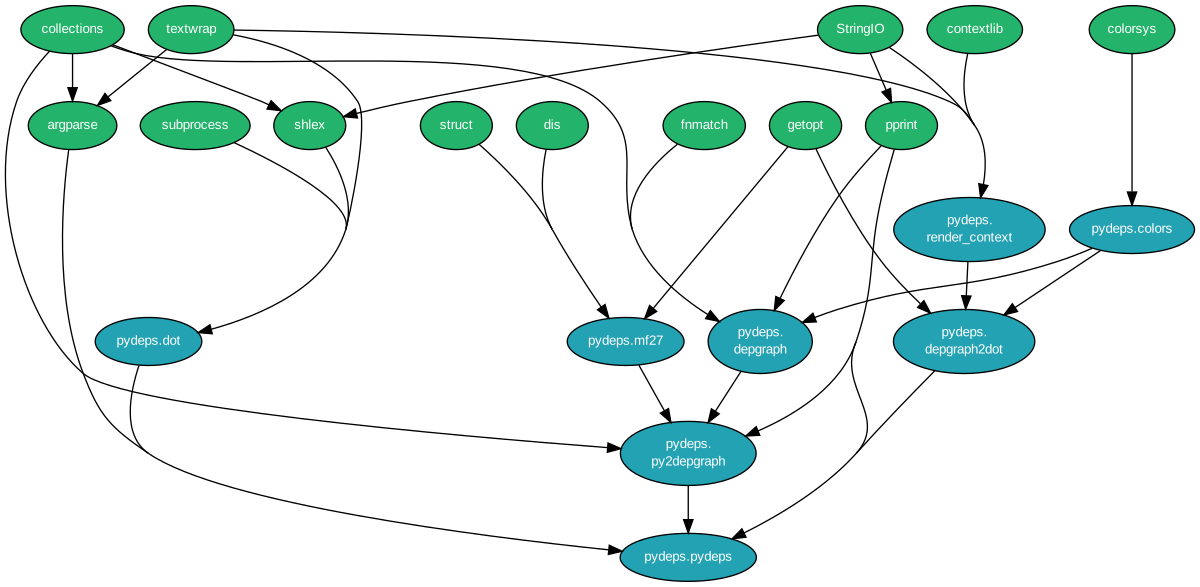
Sample generated graph — [Source](https://pydeps.readthedocs.io/en/latest/)
Learn more about this package [**here**](https://pydeps.readthedocs.io/en/latest/).
## 16\. ==Mimesis==
***“Fake it until you make it, especially in testing!”***
Mimesis is a handy Python library that helps you generate all kinds of fake data in various languages. It’s great for filling up test databases, generating fake API data, creating JSON or XML files, and even anonymizing real data.
**Key features —**
- Support generating data in 30+ languages.
- Highly customizable.
- Easy to integrate with your testing environment.
- Optimized for generating large datasets quickly.
Let’s generate some fake data using Mimesis.
```
import pandas as pdfrom mimesis import Person, Addressfrom mimesis.enums import Genderperson = Person('en')address = Address('en')data = { 'Name': [], 'Email': [], 'Phone': [], 'Street': [], 'City': [], 'Zip Code': []}n = 15 for _ in range(n): data['Name'].append(person.full_name(gender=Gender.MALE)) data['Email'].append(person.email()) data['Phone'].append(person.telephone()) data['Street'].append(address.street_name()) data['City'].append(address.city()) data['Zip Code'].append(address.zip_code())df = pd.DataFrame(data)df
```
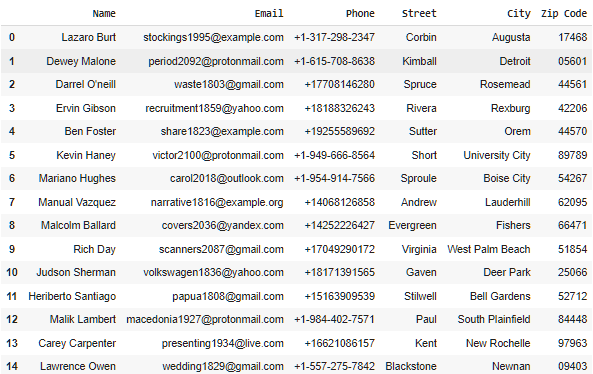
Generated Fake data — **Mimesis** — Screenshot By Author
You can learn more about this package in detail through their [**official docs.**](https://mimesis.name/master/)
## 17\. ==Numerizer==
***“Bringing words and numbers together!”***
Numerizer is a simple, yet powerful Python library that converts written numbers like *twenty-five,* into their numerical equivalents. It also supports multi-word numbers like “*one hundred twenty-two thousand.*”
```
from numerizer import numerizeprint(numerize("I have twenty-five apples.")) print(numerize("He owes me one hundred twenty-three dollars.")) print(numerize("Three dozen eggs")) print(numerize("Two Million Dollars"))
```
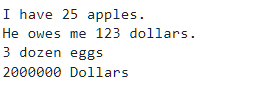
Script output — **Numerizer** — Screenshot by Author
## 18\. ==Yellowbrick==
***“Insights come alive when data meets visuals.”***
Yellowbrick is a machine-learning visualization library that provides visual tools for evaluating the performance, stability, and behavior of models, allowing users to easily compare and tune machine-learning algorithms.
Some key features of Yellowbrick Library include —
✓ Provide visual tools to understand classification, regression, and clustering models.
✓ Visual metrics for clustering algorithms, like silhouette analysis and elbow method.
✓ Works seamlessly with scikit-learn models and follows similar API conventions.
✓ Provide tools to visualize feature analysis and model selection process much simpler.
Let’s create a sample model and produce ConfusionMatrix to see beautiful visualizations of Yellowbrick.
```
from yellowbrick.classifier import ConfusionMatrixfrom sklearn.ensemble import RandomForestClassifierfrom sklearn.model_selection import train_test_splitfrom sklearn.datasets import load_winefrom sklearn.metrics import classification_reportdata = load_wine()X_train, X_test, y_train, y_test = train_test_split(data.data, data.target, test_size=0.3, random_state=42)model = RandomForestClassifier(n_estimators=100, random_state=42)model.fit(X_train, y_train)visualizer = ConfusionMatrix(model, classes=[0, 1, 2])visualizer.score(X_test, y_test) visualizer.show()y_pred = model.predict(X_test)print(classification_report(y_test, y_pred))
```
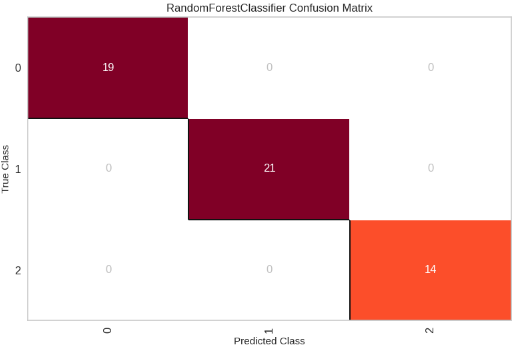
Confusion Matrix — **Yellowbrick** — Screenshot By Author
You can check out their [**Official Docs**](https://www.scikit-yb.org/en/latest/) to understand the different types of visualizations this library offers.

Tinder ❌ Jellyfish ✅
## 19. ==Jellyfish==
***“Efficient Text Matching”***
Jellyfish is a Python library that provides different string comparison methods, making it easy to find similar or phonetic matches between strings. This tool is especially useful in text processing, where exact matches are hard to come by and flexibility is important. Whether you’re cleaning up user input, comparing documents, or matching names from various datasets, Jellyfish has a variety of algorithms to help you meet your needs.
**Key features of Jellyfish
**▶️ Supports various algorithms, including Levenshtein, Jaro-Winkler, and more.
▶️ Offers phonetic encoding methods such as Soundex and Metaphone for matching similar-sounding strings.
▶️ Easy to use with various string types and encoding formats.
▶️ Efficient algorithms optimized for speed and accuracy.
Let’s build a Python script utilizing the Jellyfish library to check for impersonated domains providing proper Brand Protection. Let’s build it around “Amazon”
```
import jellyfishimport pandas as pdknown_domains = [ "amazon.com", "amazonprime.com", "amazonwebservices.com", "amazonbasics.com", "amazonmusic.com", "amazonkindle.com", "amzn.com", ]suspect_domains = [ "amzon.com", "amazonprimee.com", "amazan.com", "amazone.com", "amazonsweets.com", "amacosmaticszone.shop", "amz0n.com", "amason.com", "amzomkindle.com", "amzn.com", "amazop.com", "amazon-prime.com", "amafinance.org", "amafashion.com"]def check_for_domain_impersonation(domain_list, suspects, threshold=0.7): results = [] for suspect in suspects: best_match = None best_score = 0 for domain in domain_list: score = jellyfish.levenshtein_distance(suspect, domain) similarity_score = 1 - (score / max(len(suspect), len(domain))) if similarity_score > best_score: best_score = similarity_score best_match = domain results.append((suspect, best_match, best_score)) return resultsimpersonation_results = check_for_domain_impersonation(known_domains, suspect_domains)df_results = pd.DataFrame(impersonation_results, columns=["Suspect Domain", "Known Domain", "Similarity Score"])def highlight_similarity(val): color = 'green' if val <= 0.8 else 'red' return f'background-color: {color}'styled_df = df_results.style.applymap(highlight_similarity, subset=["Similarity Score"])styled_df.set_table_attributes('style="width: 100%; border: 1px solid black;"')styled_df.set_properties(**{'border': '1px solid black'})styled_df
```
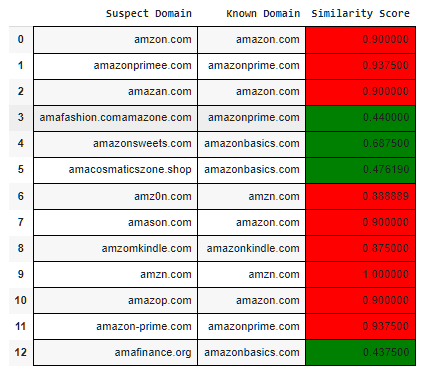
Suspect vs Known Domain — **Jellyfish** — Screenshot By Author
In the above script output, Red means the domain is kinda impersonating the original brand and Green means it is not much related to the legit domain. For example, we have kept the threshold to “0.7”, you can always change it based on your requirements.
## 20\. PyGWalker
***“Data speaks more when it's visually represented!!”***
PyGWalker is a Python package that turns your data into interactive visualization apps with one line of code and enables you to share your apps with one click.
Some key features of this package include —
- Interactive Visualization.
- Compatibility with GNNs.
- Fully customizable.
- Easy Integration with Jupyter Notebook.
- Dynamically update graphs as data changes.
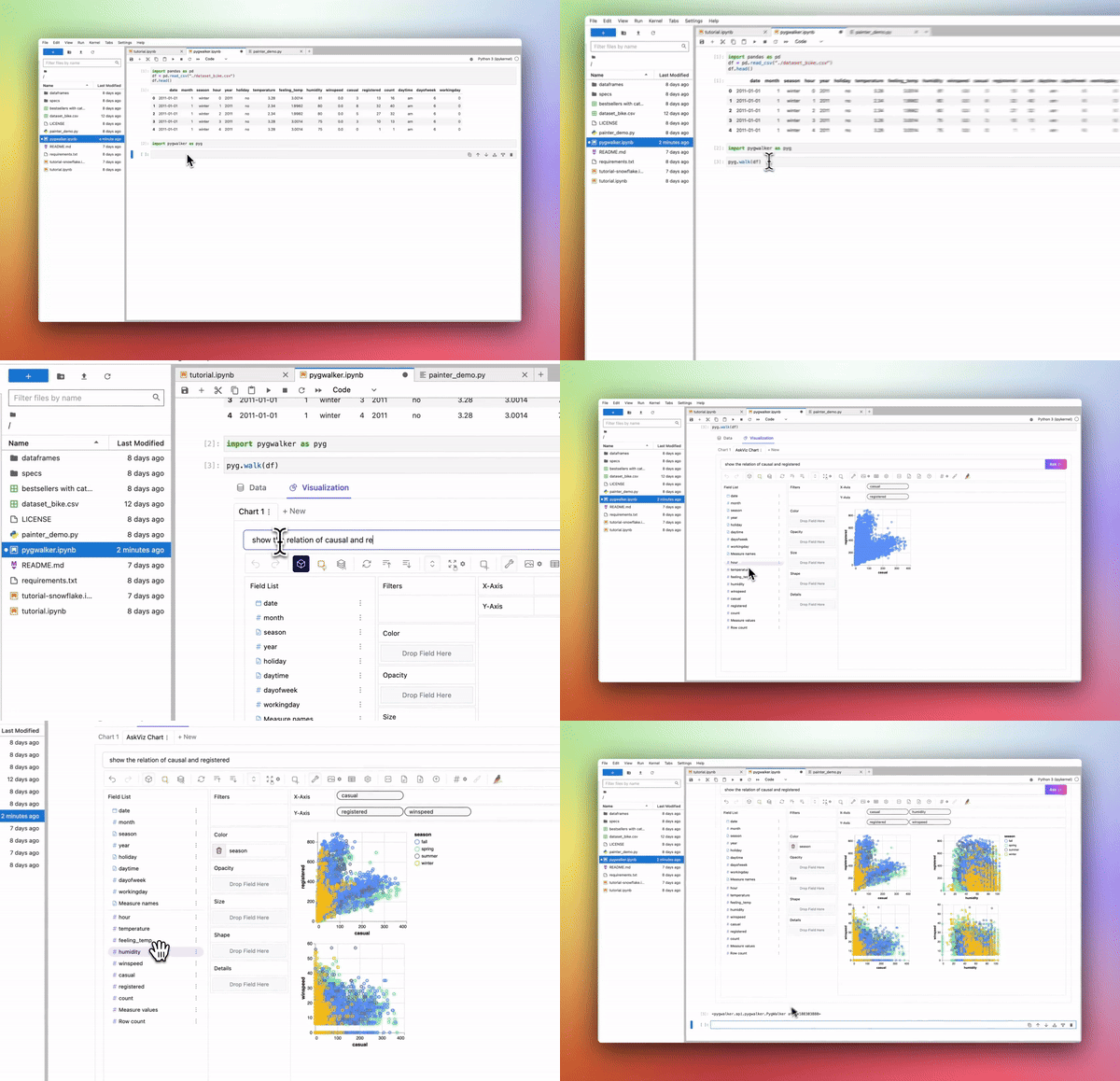
**Pygwalker** — [**GIF Source**](https://kanaries.net/pygwalker)
You can learn more about this package through their [**official docs**](https://docs.kanaries.net/pygwalker).
## 21\. ==PySnooper==
***“Never use print for debugging again”***
PySnooper is an incredibly handy debugging tool that helps you track and understand code execution with minimal effort. By wrapping your code with a simple decorator, PySnooper logs the execution flow, variable values, and line-by-line activities to give you insights into what’s happening under the hood.
- Just a decorator can avail its functionality, no need to rewrite your code.
- provides detailed logs including variable tracking and timestamps for every line of code executed.
- Easy to redirect logs to files or other channels.
Let’s use a sample code to test the functionalities of PySnooper package —
```
import pysnooper@pysnooper.snoop() def fibonacci_series(n): a, b = 0, 1 result = [] for _ in range(n): result.append(a) a, b = b, a + b return resultn = 3 fibonacci_series(n)
```
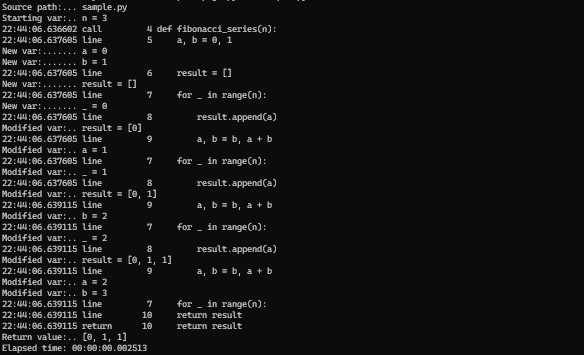
Generated Logs —**Pysnooper** — Screenshot By Author
Here’s the [**official Pypy page**](https://pypi.org/project/PySnooper/) of this library containing some examples you might wanna try.
## 22\. ==PyPerclip==
***“Keep track of your clipboard with ease!”***
PyPerclip is a simple and powerful library that provides cross-platform functionality for copying and pasting text to and from the system clipboard.
It's a cross-platform library that works seamlessly with Windows, macOS, and Linux without requiring any additional dependencies, making it a go-to tool for automating clipboard tasks in Python scripts.
```
import pyperclipdef copy_text_to_clipboard(text): pyperclip.copy(text) print(f"Copied to clipboard: {text}")def paste_text_from_clipboard(): text = pyperclip.paste() print(f"Pasted from clipboard: {text}") return textdef check_clipboard_contains(target_text): clipboard_content = pyperclip.paste() if clipboard_content == target_text: print(f"Clipboard contains: {target_text}") else: print(f"Clipboard does not contain '{target_text}' \nClipboard Text: {clipboard_content} ")def copy_and_format_text(text): formatted_text = f"***{text.upper()}***" pyperclip.copy(formatted_text) print(f"Copied formatted text to clipboard: {formatted_text}")def demo_text_operations(): copy_text_to_clipboard("Python Programming\n") pasted_text = paste_text_from_clipboard() check_clipboard_contains("Machine Learning") copy_and_format_text("Hello World!!") paste_text_from_clipboard()demo_text_operations()
```
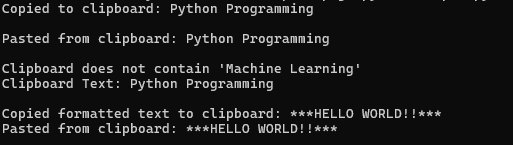
Sample Script Output — **Pyperclip** — Screenshot By Author
## 23\. Tabulate
***“Turn your data into beautifully formatted tables”***
Tabulate is designed to make it easy to create and display data in the form of pretty, well-organized tables. Whether you’re working with lists, dictionaries, NumPy arrays, or Pandas DataFrames, Tabulate will help you present your data in a clean, readable format. It’s widely used in both CLI (command-line interface) applications and Jupyter notebooks.
```
from tabulate import tabulatedata = [ ["John", 28, "Software Engineer", "New York"], ["Sara", 35, "Product Manager", "San Francisco"], ["John", 25, "UX", "Florida"], ["Charles", 29, "InfoSec", "Austin"], ["David", 42, "Data Scientist", "Boston"], ["Maria", 30, "Designer", "Seattle"], ["Chris", 35, "Red Team", "Ohio"]]headers = ["Name", "Age", "Job Title", "Location"]fancy_grid_table = tabulate(data, headers, tablefmt="fancy_grid")print(fancy_grid_table)
```
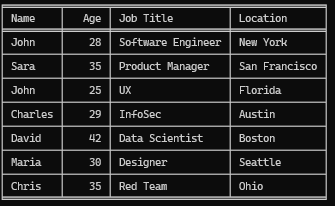
Generated Table — **Tabulate** — Screenshot By Author
Thanks For Reading Till Here, If You Like My Content and Want To Support Me The Best Way is —
1. ==Leave a Clap👋and your thoughts 💬 below.️==
2. Follow Me On ==[***Medium***](http://abhayparashar31.medium.com/)==.
3. Connect With Me On [***LinkedIn***](https://www.linkedin.com/in/abhay-parashar-328488185/).
4. Attach yourself to [***My Email List***](https://abhayparashar31.medium.com/subscribe) to never miss reading another article of mine
5. Do Follow ==[**The Pythoneers**](http://medium.com/pythoneers)== Publication for more similar stories.