
11 KiB
title, source, author, published, created, description, tags
| title | source | author | published | created | description | tags | ||
|---|---|---|---|---|---|---|---|---|
| Obsidian’s New Bases Feature is The Biggest Update Since Properties | https://medium.com/obsidian-observer/obsidians-new-bases-feature-is-the-biggest-update-since-properties-2aad08a102eb |
|
2025-07-28 | 2025-08-29 | The video was a very off-the-cuff piece of work that I recorded in one take when I read on Twitter that the new feature had come out. I jumped straight on recording, with no preparation, because I… |
|

Welcome to The Obsidian Observer, a hub for all Obsidian enthusiasts. Whether you’re a beginner or a seasoned pro, our publication delivers in-depth how-to guides, innovative workflows, and captivating opinions to help unlock your note-taking potential.
If you’re not a Medium member you can still read this piece for free by clicking my friend link here — Obsidian’s New Bases Feature is The Biggest Update Since Properties
Now, this isn’t the first piece of work on the internet published about Obsidian Bases.
But I made a YouTube video that I shared when Bases first came out…
…and so I thought I could take my time with putting together this article.
The video was a very off-the-cuff piece of work that I recorded in one take when I read on Twitter that the new feature had come out.
I jumped straight on recording, with no preparation, because I knew how important and powerful Bases were going to be inside the PARAZETTEL system in my vault (which you can try for free at this link).
Since then, I’ve been very busy with university work (I’ve now graduated completely!) and I’ve neglected to write a longer, more detailed round-up.
But, finally, I thought I’d tackle Obsidian bases and tell you a little about how I’ve been using them for the last couple of months…
What are Obsidian Bases?
Do you remember a couple of years back when Obsidian released the Properties update? Where we could now look at our notes’ properties formatted nicely at the top of our note as opposed to somewhat ugly YAML metadata?
For a long time, Dataview (one of the most popular Obsidian plugins) was the only plugin that we could use to query those properties of our notes and display them in a nice, readable output format, like a table or a list.
But recently, along came the Bases feature, and they blew Dataview out of the water by introducing a more powerful, capable, and native (as opposed to third-party) property aggregation and display feature.
Bases are actual separate individual files inside your Obsidian vault, with the extension.base, and you can configure them to query and display your notes in any way you’d like, given you’ve added note properties.
As well, in the resulting views that are displayed, you can actually edit the properties of the notes that are displayed. This was one of the ways in which Dataview fell short, as a data-view-only (duh) rather than a complete property querying and managing solution.
But even though both Dataview and Bases are extremely powerful and useful tools, there is only one way that I use (or used in the case of the former) them in my vault…
My primary use of Obsidian Bases
Some of my most popular work has been where I talk about using Folder notes and Dataview to create indexes of different areas of my note-taking system.
It’s my most popular video on YouTube as of right now, and one of my oldest, most popular articles that I published back in 2023. Today the plugins Dataview and Folder notes remain two of the only third-party additions to the PARAZETTEL vault and system that I share.
Folder notes are simply notes that appear as you click the folder name in the sidebar in Obsidian. As opposed to expanding the folder in the Explorer, you can open up a note that is a folder note. So, an index and a place to write any general notes related to that folder and its contents.
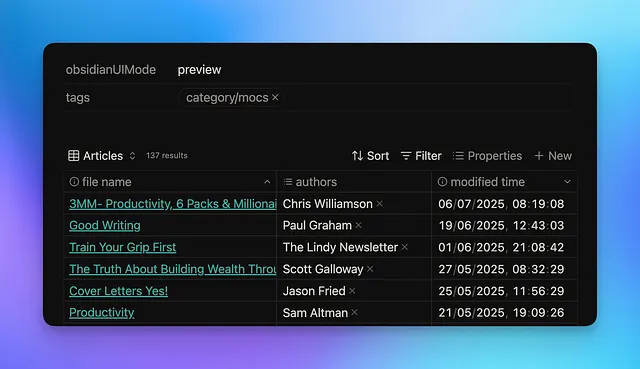
And now that Bases have come along, they’ve taken the place of Data View in the displaying of notes in certain folders on the indexes of folder notes.
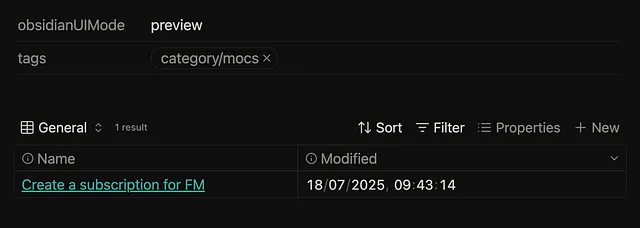
Here is the embedded Base in a folder note of a project that I’m just about to start working on
What’s also useful is that I’ve created a simple base template that I call MoC (Map of Content is the widely known name, even though I more often refer to these notes as Indexes).
Every time I create a new Folder note index, all I’ve got to do is embed that one base, and it’s configured to just display that folder’s notes with no additional configuration on my end.
This means I have one main base that I’ve already embedded into a template. This saves me so much time in getting the bulk of my work set up. However, I’ve got one or two more different Bases in my vault…
The other places I use special bases
I mentioned that aside from this MoC.base, I had a few other specific use cases for different Bases, where I created custom solutions for each purpose.
One of these is in my Content folder, where I can now very simply separate out all the different types of work that I’m going to be writing in the drafts, and very quickly browse through when I feel like writing something specific that day (think an article for here or a YouTube video to share)…
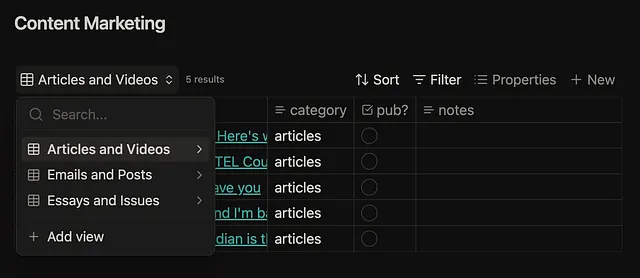
This is one.base, with three different views built in for different types of content
And that’s the good thing about Bases as well — you can have a single base as such with options to create multiple different views that you can configure differently.
Also, inside my Readwise folder, where I import all of my highlights from content I’ve read or otherwise consumed, I have a custom base that works in a very similar way…
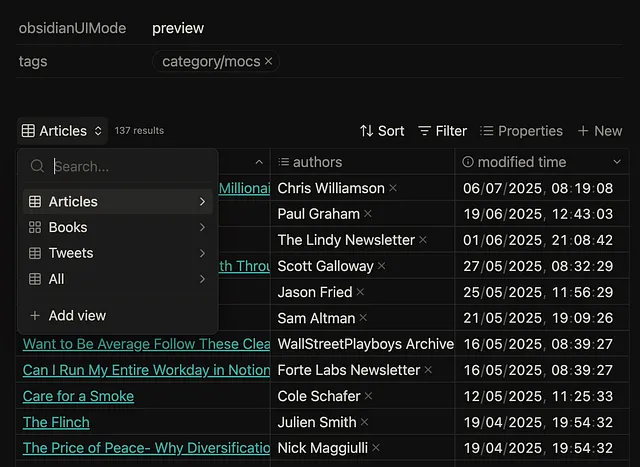
Filtering by content type can be very useful
It’s very useful to see all of the most important details about a source without actually having to go through the process of opening up the page and reading it there.
And that’s it for my own use cases. But that’s not to say that I might not have other ambitions to use the feature in the future.
Other places I might look to use Bases
I was inspired when I saw Steph Ango, Obsidian CEO, use a combination of bases and the Leaflet plugin that allows you to view maps to create a list of locations.
Whilst I still use Google Maps for this, it seems nice to move more and more of your life offline and into your Obsidian vault, where privacy is higher and the scope to link different bits and pieces together is much greater.
Bases also work very well with using the Obsidian Web Clipper to save content from the internet into Obsidian.
And now, while I use Readwise to clip highlights mostly, rather than full pieces of content, I’ve also been looking at creating a folder where my website clippings are saved as well, necessitating a Base to display this.
But as of right now, Bases are pretty much only used for me to display the notes inside a certain folder, and that’s what I’ll continue to use them for until I find something else worthwhile doing.
Because I am such a big proponent of Minimal Note-Taking, I don’t want to try and include them where I don’t need to include them, seeing as that will create additional distraction for not much extra benefit in my workflow.
That brings us to the end of this more deliberate, but still rather simple, round-up of what I use Bases for.
I didn’t want to give you the actual ins and outs of how the feature works, because you can watch the video, or even better, give it a try yourself. You learn more quickly and concretely by trying to figure out how things work in the first person.
Instead, I just wanted to point out the things I use the feature for. I want to teach you functional note-taking, and so it would feel slightly disingenuous if I started sharing loads of junk sentences about use cases I don’t actually have, hence the insight on Folder notes, indexes, and only a little else.
Let me know if there are other Bases uses you’ve seen that you think are interesting and want me to take a look at, though!
Anyway, I graduated from university, very soon before the writing of this piece. I’m going to be sharing something soon, talking about this and my ambitions for the future with these articles and wider PKM content.
And so, thank you for reading for today — I’ll publish this new piece soon!
Try my free Obsidian vault PARAZETTEL
Theory + proven system to master PKM
All my paid resources in a single place


Welcome to The Obsidian Observer, a hub for all Obsidian enthusiasts. Whether you’re a beginner or a seasoned pro, our publication delivers in-depth how-to guides, innovative workflows, and captivating opinions to help unlock your note-taking potential.
Responses (2)
Thomas Peetz
What are your thoughts? Aaat
[
Aug 3
good article. keep good working.
5
Congrats on graduation! Thanks for this article on Bases and your use cases. I’d love to see the code for your Folder Note base and especially your Readwise one.
5
More from Theo Stowell and Obsidian Observer
Recommended from Medium
[
See more recommendations