
5.6 KiB
title, source, author, published, created, description, tags
| title | source | author | published | created | description | tags | ||
|---|---|---|---|---|---|---|---|---|
| Mistakes That Make You Look Like a Noob Developer! | https://medium.com/write-a-catalyst/mistakes-that-make-you-look-like-a-noob-developer-e1784b48a1b5 |
|
2024-09-18 | 2024-10-29 | Any programming language will have an abundance of features to make a developer's life easier and more productive. Still, with any programming language, even senior developers fail to implement best… |
|
And Learn how to Fix Them
[

[

Hello, fellow devs out there!
==Any programming language will have an abundance of features to make a developer's life easier and more productive. Still, with any programming language, even senior developers fail to implement best practices and make these common mistakes.==
The following common mistakes in C# will make you look like a noob, understand how to fix them to become a pro developer.
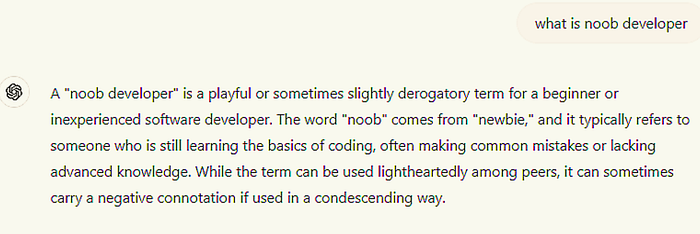
Glimpse of what ChatGPT has to say about noob developer

1. Using Var Everywhere Without Understanding Its Implications
Mistake: The C# var keyword is a convenience that enables the compiler to infer the type of a variable. Used too frequently, or without knowing what type is being used, can result in code less readable and thus less maintainable.
var list = new List<string>(); var item = list[0];
In this second line, we can’t tell what type of item is, so we have to do some extra work to determine what this code is doing.
How to Fix It:
Use var Only when the type is obvious from the right-hand side of the assignment. Otherwise, code readability improves with explicit types. That is, prefer explicit typing for clarity when the type is not immediately obvious.
List<string> list = new List<string>(); string item = list[0];
That’s a good practice because it improves readability.
2. Improper Use of using Statements
Mistake: You will cause resource leaks, and most probably performance issues if you don’t dispose of resources like file streams and database connections.
public void ReadFile(string path){ FileStream stream = new FileStream(path, FileMode.Open); StreamReader reader = new StreamReader(stream); }
Resource Leak failing to close/Dispose of FileStream and StreamReader,
How to Fix It:
Dispose of resources through using Statements. Resources are disposed of after use in using statements. Using statements is much better for memory I/O along with other disposable resources.
public void ReadFile(string path){ using (FileStream stream = new FileStream(path, FileMode.Open)) using (StreamReader reader = new StreamReader(stream)) { } }
The
usingstatement will ensure proper cleanup of resources in the case of exceptions.
3. Overusing public Fields Instead of Properties
Mistake: One of them is exposing fields directly in the classes using public fields instead of properties. It will make your code less encapsulated and hard to maintain.
public class Person{ public string Name; }
This direct access to the field results in uncontrolled changes, and you cannot add any kind of validation or logic while accessing the field.
How to Fix It:
Encapsulate fields using properties. You can control access to the data via properties and add your validation logic when you set the values.
public class Person{ private string _name; public string Name { get { return _name; } set { if (string.IsNullOrEmpty(value)) throw new ArgumentException("Name cannot be null or empty"); _name = value; } }}
Encapsulation could be better using properties with more fine-grained levels of control about how the data is accessed and modified.
4. Not Handling Exceptions Properly
Mistake: Catching all general exceptions and not handling or swallowing them appropriately makes debugging hard to conduct because the real cause of the problem is obscured.
public void ProcessData(){ try { } catch (Exception ex) { }}
Swallowing an exception or catching a general exception without specific handling causes silent failures and makes diagnosing issues much harder.
How to Fix It:
Catch specific exceptions and practice meaningful error handling/logging. That would be very instrumental in diagnosing/debugging the problems. That might look something like this:
public void ProcessData(){ try { } catch (FileNotFoundException ex) { Console.WriteLine($"File not found: {ex.Message}"); } catch (IOException ex) { Console.WriteLine($"IO error: {ex.Message}"); } catch (Exception ex) { Console.WriteLine($"An unexpected error occurred: {ex.Message}"); }}
It tends to make your application more robust, and easier to troubleshoot, with specific exceptions caught and appropriate handling or logging done.