
7.9 KiB
title, source, author, published, created, description, tags
| title | source | author | published | created | description | tags | ||
|---|---|---|---|---|---|---|---|---|
| Java Thread Performance Boost in Java 21: Virtual Threads | https://medium.com/@lbq999/java-thread-performance-boost-in-java-21-virtual-threads-aa3bf8304539 |
|
2024-10-02 | 2024-10-29 | With the release of Java 21, the virtual threads introduced under Project Loom represent a breakthrough in Java thread performance. These lightweight threads offer a huge boost in scalability, making… |
|
[

](https://medium.com/@lbq999?source=post_page---byline--aa3bf8304539--------------------------------)
Introduction
With the release of Java 21, the virtual threads introduced under Project Loom represent a breakthrough in Java thread performance. These lightweight threads offer a huge boost in scalability, making it possible to manage vast numbers of concurrent tasks efficiently. But what’s the magic behind this performance leap? The key lies in continuations — a powerful mechanism that allows threads to pause execution and resume later, enabling efficient thread management without blocking system resources.
This article explores how virtual threads, powered by continuations, deliver a dramatic performance improvement in Java 21. We’ll also dive into how virtual threads are implemented using Java’s Continuation API and show how this API helps achieve such high levels of concurrency and scalability.
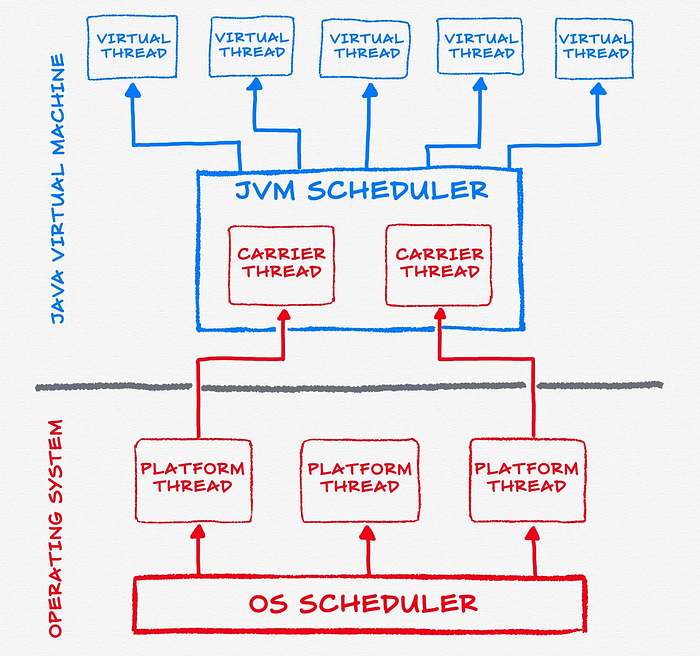
Overview of Virtual Threads
What Are Virtual Threads?
Virtual threads are a new type of thread introduced in Java 21, designed to be lightweight and efficient. Unlike traditional platform threads, which are mapped one-to-one to operating system threads, virtual threads are user-mode threads managed by the Java Virtual Machine (JVM). This design allows for the creation of millions of threads with minimal resource overhead.
The virtual thread scheduler dynamically mounts virtual threads onto platform threads only when CPU resources are needed. When a virtual thread is waiting (e.g., during I/O operations), it is unmounted from the platform thread, freeing up resources to run other tasks. This mechanism ensures that CPU resources are utilized more efficiently and threads are not blocked unnecessarily.
Key Characteristics of Virtual Threads
- Lightweight Threads: Virtual threads consume significantly less memory and can be created in large numbers.
- No Thread Pooling: Since virtual threads are inexpensive to create and discard, there’s no need for pooling.
- High Scalability: Millions of virtual threads can exist simultaneously without overwhelming system resources.
- Efficient CPU Usage: By pausing execution during blocking operations, virtual threads free up CPU resources for other tasks.
Continuations: The Key to Virtual Thread Performance
What Are Continuations?
Continuations are the core mechanism that makes virtual threads so efficient. They enable a program’s execution to pause and resume, essentially storing the current state of the program. In the context of virtual threads, continuations allow a thread to pause its execution (for example, when it’s waiting for I/O) and later resume where it left off without blocking the underlying platform thread.
How Continuations Work
A continuation captures a snapshot of a program’s current execution state. When the thread needs to wait (e.g., for an I/O operation), the continuation pauses the thread and stores its state. Once the blocking operation completes, the continuation resumes the thread’s execution, effectively allowing the JVM to manage many threads without blocking critical system resources.
In Java, the Continuation API is used to create and manage continuations. While this API is primarily for internal use within the JVM, understanding how it works is key to grasping how virtual threads deliver such high concurrency.
Full Code Implementation
Virtual Thread Class
The virtual thread is implemented using a Continuation, which allows the thread to pause and resume its execution. This class also assigns an ID to each virtual thread for identification.
import java.util.concurrent.*;import java.util.concurrent.atomic.AtomicInteger;public class VirtualThread { private final Continuation continuation; private static final ContinuationScope SCOPE = new ContinuationScope("VirtualThreadScope"); private final int id; private static final AtomicInteger counter = new AtomicInteger(1); public VirtualThread(Runnable task) { this.id = counter.getAndIncrement(); this.continuation = new Continuation(SCOPE, task); } public void run() { System.out.printf("Virtual thread %d is running on platform thread %s%n", id, Thread.currentThread().getName()); continuation.run(); } public boolean isDone() { return continuation.isDone(); }}
Virtual Thread Scheduler
The virtual thread scheduler manages a queue of virtual threads and assigns them to available platform threads for execution.
public class VirtualThreadScheduler { private final Queue<VirtualThread> queue = new ConcurrentLinkedQueue<>(); private final ExecutorService executor = Executors.newFixedThreadPool(3); public void start() { new Thread(() -> { while (true) { VirtualThread vt = queue.poll(); if (vt != null) { executor.submit(vt::run); } } }).start(); } public void schedule(VirtualThread vt) { queue.offer(vt); }}
Simulating Blocking Operations
In the WaitingOperation class, a simulated blocking operation is performed. During the operation, the virtual thread pauses using Continuation.yield() and resumes after the operation completes.
import java.util.Timer;import java.util.TimerTask;public class WaitingOperation { public static void perform(String operation, int seconds) { System.out.printf("Waiting for %s for %d seconds%n", operation, seconds); Continuation.yield(VirtualThread.SCOPE); new Timer().schedule(new TimerTask() { @Override public void run() { Demo.scheduler.schedule(VirtualThread.current()); } }, seconds * 1000L); }}
Main Program (Demo)
The Demo class demonstrates how to create and schedule multiple virtual threads. Each virtual thread simulates waiting for a resource (e.g., network or database) and resumes execution afterward.
public class Demo { public static final VirtualThreadScheduler scheduler = new VirtualThreadScheduler(); public static void main(String[] args) { scheduler.start(); VirtualThread vt1 = new VirtualThread(() -> { System.out.println("1.1"); WaitingOperation.perform("Network", 2); System.out.println("1.2"); System.out.println("1.3"); System.out.println("1.4"); }); VirtualThread vt2 = new VirtualThread(() -> { System.out.println("2.1"); WaitingOperation.perform("Database", 5); System.out.println("2.2"); System.out.println("2.3"); System.out.println("2.4"); }); scheduler.schedule(vt1); scheduler.schedule(vt2); }}
Output Example
When executed, the virtual threads are scheduled on platform threads, perform their tasks, and simulate blocking operations:
Virtual thread 1 is running on platform thread Thread-01.1Waiting for Network for 2 secondsVirtual thread 2 is running on platform thread Thread-12.1Waiting for Database for 5 secondsVirtual thread 1 is running on platform thread Thread-01.21.31.4Virtual thread 2 is running on platform thread Thread-02.22.32.4