
6.6 KiB
title, source, author, published, created, description, tags
| title | source | author | published | created | description | tags | ||
|---|---|---|---|---|---|---|---|---|
| You Won’t Believe What I Discovered About IP Addresses! | https://levelup.gitconnected.com/you-wont-believe-what-i-discovered-about-ip-addresses-570fe767499e |
|
2024-10-03 | 2024-10-29 | Learn the fundamentals of IPv4 and discover how IP addresses work. Explore how binary conversions simplify addressing in a format you can easily understand. |
|
You Won’t Believe What I Discovered About IP Addresses!
I am sure you will learn something new today!
[

](https://devopstory.com/?source=post_page---byline--570fe767499e--------------------------------)
[

Feature Image Created in Canva
When you first look at an IP address (IPV4), such as 192.168.0.1, it’s easy to assume the dots are part of the IP address. We know that the definition of an IP address is:
An IP address is a string of numbers separated by periods. IP addresses are expressed as a set of four numbers — an example address might be 192.158.1.38. Each number in the set can range from 0 to 255. So, the full IP addressing range goes from 0.0.0.0 to 255.255.255.255.
Source: www.kaspersky.com
As an example, when you see
8.8.8.8, you will comfortably say yes, it’s an IP that belongs to Google DNS.
==But you see this== ==134744072== ==You will probably say it’s a string of numbers and may not be an== ==IP address.==
Understanding the Concept
Now, before we move forward and decide on whether this number is a large integer or an IP address, we need to understand that an IPv4 address is just a 32-bit number,
e.g. 00001010000010110000110000001101
To make the IP address space easy for people to use, both a standard number system and the smallest numbers possible had to be used. In terms of the first of these criteria, people think in terms of the Base10 number system, but computers are binary by nature (excluding quantum computing 😅 ).
It is impossible for most of us to reliably remember the 32-bit address strings of binary numbers that computers and computer networks use to talk to each other.
It should be easier for people to understand any 32-bit string of binary numbers if they were turned into decimal numbers. After all, people are so used to the Base10 number system that it’s like second nature.
Unfortunately, a 32-bit binary number could turn into a decimal number that is so big that people can’t really understand it. Think about trying to remember the address of Google DNS: 13,47,44,072.
To fix this, the architects of the internet did something brilliant. They chunked that massive 32-bit number into four smaller parts, or octets, each containing 8 bits.
Here’s what that would look like:
1000 1000 1000 1000
Each octet is still a binary number, but we don’t see it that way in everyday life. Instead, each 8-bit chunk is converted into its decimal form (between 0 and 255) and separated by dots: 8.8.8.8
Now, suddenly, that massive 32-bit address is much easier to handle. Instead of one overwhelming string of numbers, we have four smaller, bite-sized chunks.
The dots serve as visual markers that divide these octets. They also help distinguish between class-full networks and network boundaries in subnetting. Without them, we would be staring at a string of numbers that would take forever to decode. They make IP addresses easier for humans to read, write, and remember.
Think of it like trying to remember someone’s phone number. You don’t memorise it as 134744072. Instead, you chunk it into sections:
13-47-44-072
The dots do exactly that for IP addresses.
The Million-dollar Question
Now, million-dollar questions: is this number 134744072 an IP? The answer is yes; as I mentioned above, it’s a 32-bit number that can represent an IP address, and that’s it. If you give this number to your browser (obviously with a proper context like HTTP), it can read it as an IP address. All devices and routers will also be able to understand it because they all work with 32-bit binary numbers.
How did I come to this number?
To convert an IP address like 8.8.8.8 into a single integer, we treat each octet as a separate value and multiply it by powers of 256 based on its position in the sequence (starting from the left). Here's how it works:

Image used to show the calculation
So, the calculation looks like this:

Image used to show the calculation
The result of this expression is 13474407
This process converts the familiar dotted-decimal format into a single, large integer.
You can try the same in your browser as well!
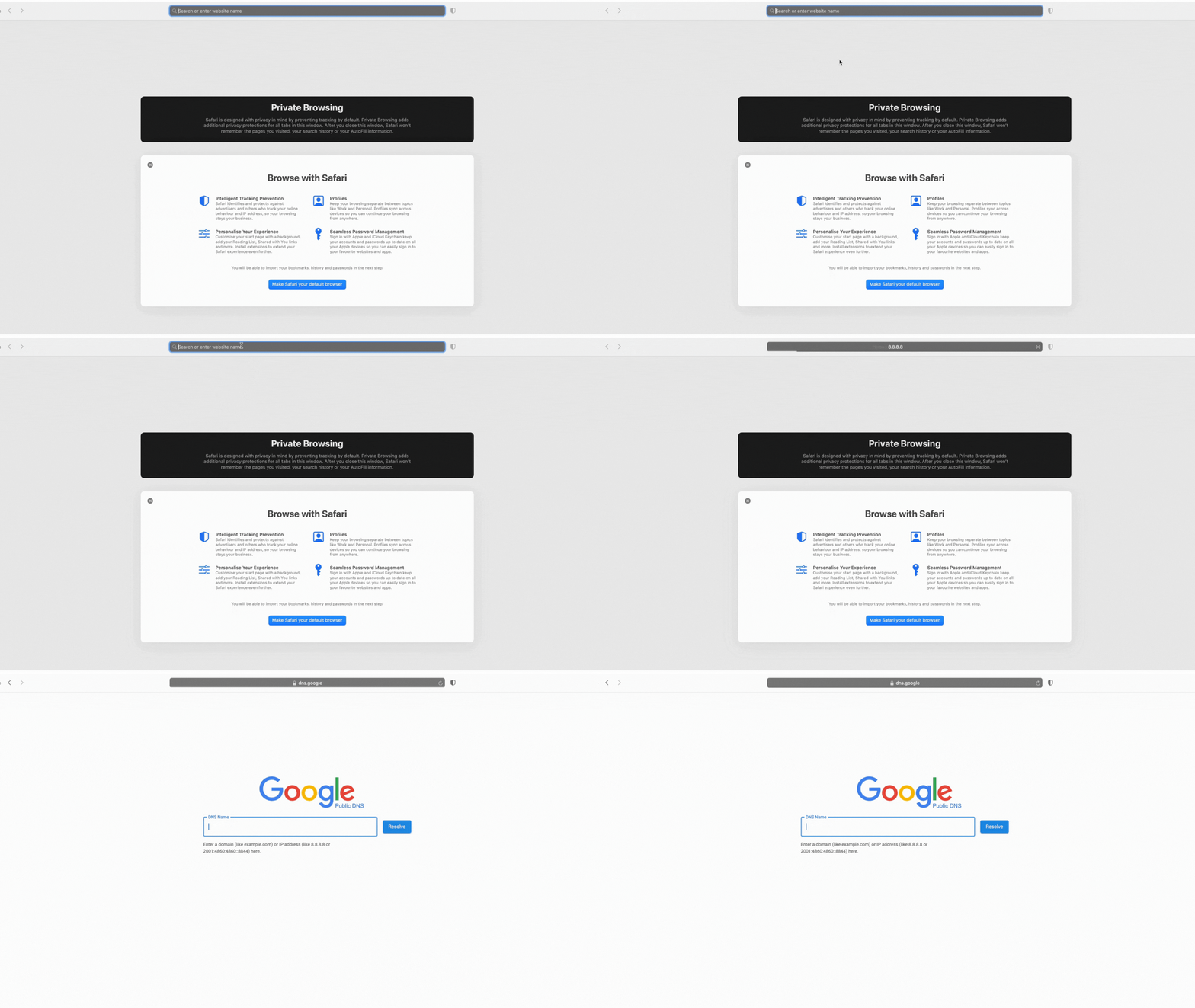
Image showing the integer as an IP address
Closing Thought
Understanding this concept can help you in various cases. For example, one of the use cases can be Database Storage: Putting IP addresses in databases as integers (like 134744072) instead of strings (like “8.8.8.8”) can help them take up less space. When it comes to storage and retrieval times, integer operations are often faster than string operations.
Another one could be Sorting IP Addresses: To easily sort a list of IP addresses by number, you can convert them to integers first. This is very helpful in situations like checking firewall rules or access control lists (ACLs).
On the other side, this information is what I perceived from various sources, and one of the book references is IP Addressing Fundamentals by Mark A. Sportack, from where I understood that this is also another way of approaching the IPV4. I added my opinions in this, which you may or may not agree with. If you are a network expert, you may have your perfectly acceptable views.